View History
Once enabled in Setup (above) an entry is made in the History table each time the Dimension related to a document are changed. There two ways of viewing Dimension Manager History: history for a single record or all the history for all the records.
Viewing Single Dimension Manager History
Each place that offers the ability to change Dimension values, also offer the ability to view Dimension Manager History. If a change has been made, NAVIGATE to the source of the change – the Navigation screen, the Customer Card, etc. You may view Dimension Manager History from any card, but not from a list. An example appears below.
-
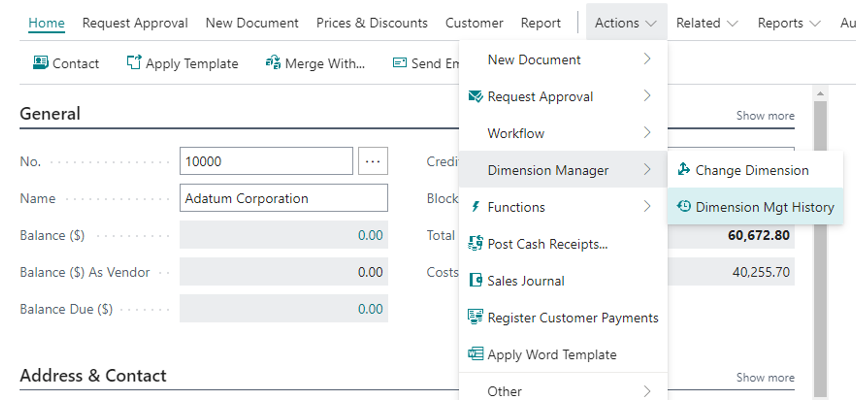
Open a Document that has had its Dimensions changed and Navigate on it. Click on Dimension Mgt History, as in the next image.
Click to view full-size image.
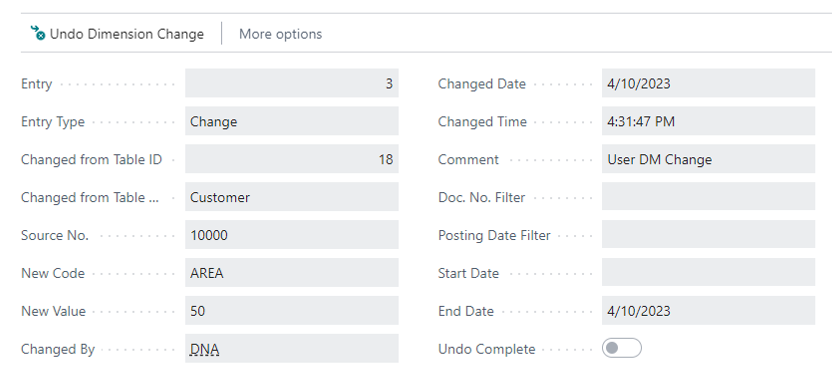
The Dimension Manager History card shows the details of the Dimension change. The Source No. tells which customer was changed. The Changed By User ID, the Date and Time, displays who made the change and when it was made The table on bottom portion of the form displays the details of what tables and records have been change along with the Dimension vale prior to the change and the new value to which it was changed.
Click to view full-size image.
All Dimension Manager History
-
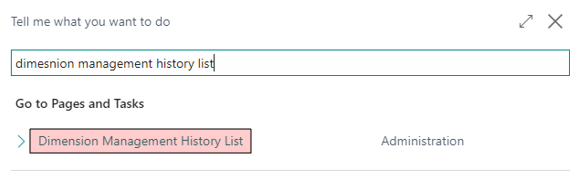
To view this screen, search for Dimension Manager History List.
-
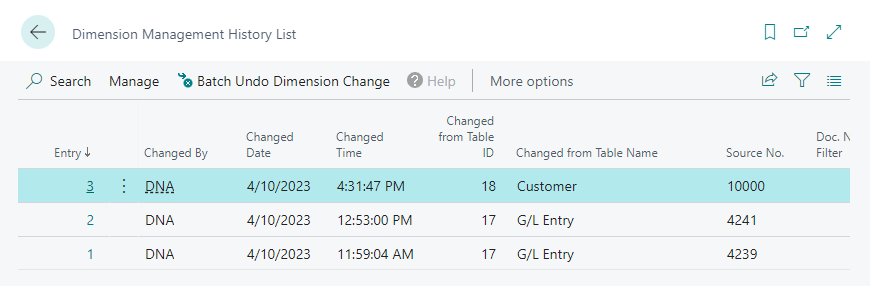
Select Dimension Manager History List, as shown above. The following screen will appear.
Click to view full-size image.
Click to view full-size image.
The Dimension Manager History List form displays all the records of all the Dimension changes that have been performed. From this screen, a user may filter on any field to locate the desired record of a change. Which may be viewed as in step 2 of the Viewing Single Dimension Manager History procedure.