API: Deferral Schedule Line
A new API has been created in Build 41.0 that is used to create a schedule line deferral. Previously we were able to use this API to create a new schedule line, but this new API allows us to create a schedule line and make it a deferral. This API supports two request types: GET (retrieve the data of previously-created schedules), and POST (create a new schedule line). The existing data cannot be modified with this API.
Prerequisites
In the Json code, the BssiAREDDeferral parameter (highlighted in blue, below) must be set to true. Once this is done, then the new schedule line will be a deferral.
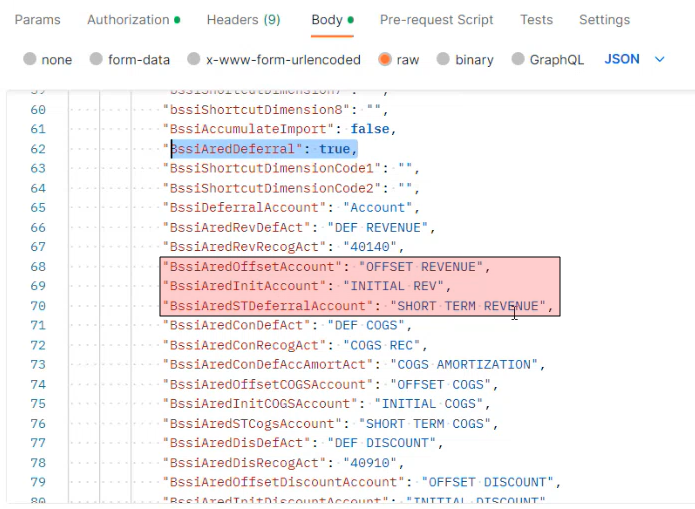
Next, all of the accounts (highlighted in red, above) need to be listed. For example: deferral account, short-term account, profit or loss account etc.
Then the schedule type needs to be specified, either straight line or event-based. This is done via the BssiAredScheduleType parameter, highlighted in blue, below.
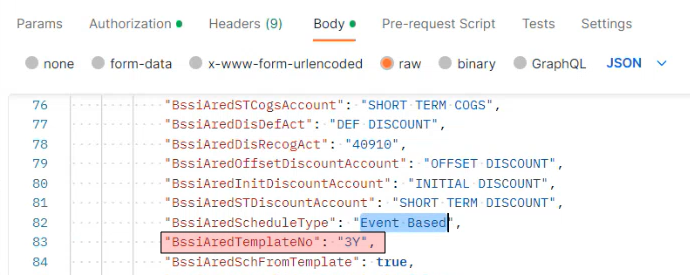
Next, the template needs to be added.
-
If you are creating a straight line schedule, then the template line is added directly under the schedule type parameter, on line 83, highlighted in red, above.
-
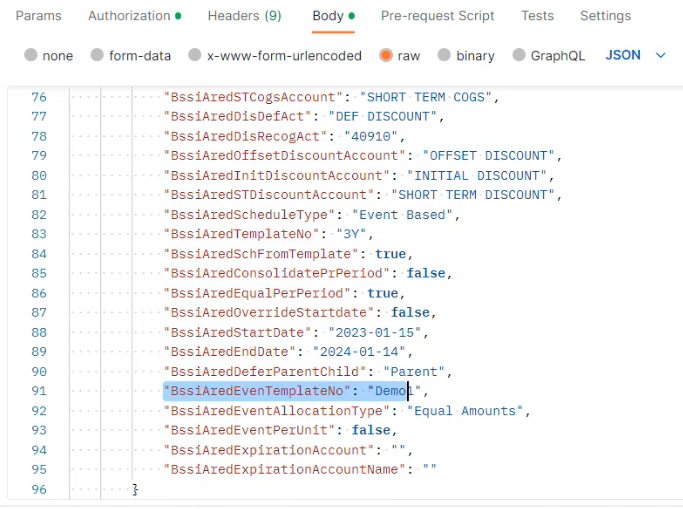
If the schedule is event-based, then the template line needs to be added in the following location, as shown in line 91, below.
Next go to the Web Services in Business Central, and select the piece. Then click on the +New link and paste the Object Type into its corresponding field. Give the Service a name.
Copy the Copy the OData v4 URL, paste it into the Postman URL field, click on the GET request, and press the Send button.

Initially, all of the data from all of the schedules will be displayed.
Note: In this API, you can only create the schedule; you can't create the schedule header.
