In this article
SBS ARCB Unbilled Revenue Reconciliation Report
Use this page to generate a report for all unbilled revenue for lines in a billing schedule that satisfy the filter criteria specified.
Generate a Report
To generate a report, follow these steps:
- In the Options FastTab, specify the following:
- Select the As of Date.
- In the Billing Schedule Line FastTab, specify the following:
- Select the billing schedule and end user numbers.
- Select the sell-to customer number.
The report shows all records that satisfy the specified criteria.
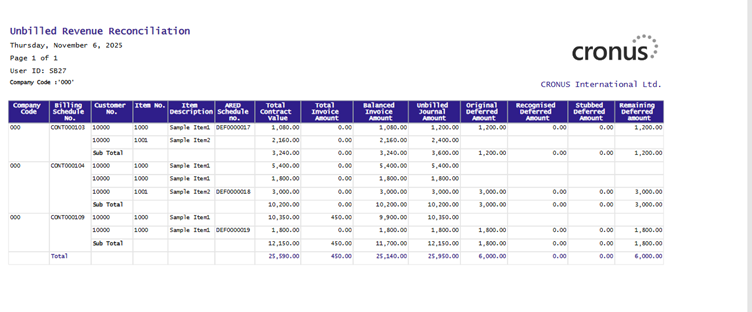
Fields
This page contains the following fields:
| Field | Description |
| Options | |
| Billing Schedule No. | Displays the Billing Schedule No. |
| Customer No. | Displays the Customer No in Billing Schedule. |
| Item No. | Displays the Unbilled Revenue Item Number. |
| Item Description | Displays a description of the item. |
| ARED Schedule No. | Displays the Deferral schedule No. |
| Total Contract Value | Displays the Total Contract Amount. |
| Total Invoice Amount | Displays the Total Invoiced Amount. |
| Balanced Invoiced Amount | Equals the Total Contract Value minus the Total Invoice Amount. |
| Unbilled Journal Amount | Displays the amount after creating initial journal entry or after applying stubbing. |
| Original Deferred Amount | Displays Total deferred amount. |
| Recognized Deferred Amount | Displays the total recognized amount. |
| Stubbed Deferred Amount | Displays the total stubbed amount. |
| Remaining Deferred Amount | Displays the remaining unrecognized amount. |
