Point Pack Detail
This page will allow users to view customer point pack details.
-
New point pack entries can be added or deleted through both UI and API.
-
Existing point pack entries, if the points have not been consumed, can be modified through the UI only.
-
Point transfers between customers or licenses can be performed via API only
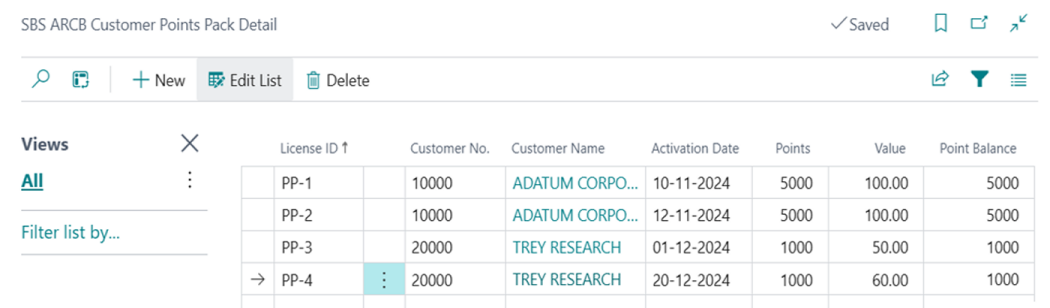
Screen Functionality
If points have not been used, then they can only be deleted.
A new API (v2) has been created, and users can add or delete values via this API.
Users can modify records, as long as this action does not reduce their point balance. In order to modify a record, it must first be deleted and then re-inserted with the new values.
Note: The Balance field will be non-editable, and will not be visible on the page. The Balance field cannot be modified via this screen or via the API.
The License ID must be unique for every line, whether it's for the same or a different customer. For example: A customer purchased 1,000 points with PP-1 license on Sep-10. Therefore, no other customers or even the same customer cannot enter the same license “PP-1” again.
Deleting Records
The user needs two APIs to delete the records.
Delete by License ID: The v2 API is used to delete the records from this screen or from the table. The user will pass the License ID, and from that License ID, and only records with that license ID will be deleted.
Delete by Customer: The v2 API is used to delete the records from this screen or from the table. The user will pass the Customer ID, and from that Customer ID, and only records with that Customer ID will be deleted.
Point Transfer
Point Transfer by License ID or Customer ID: If the end user wants to transfer the point balance from one customer to another customer, then the API will be used for the transfer. Then, a log entry will be added to the audit table.
Fields
| Field | Description |
| License ID | Stores the points-pack ID. It is a unique identifier for each transaction record. |
| Activation Date | Captures the date on which the points-pack was purchased or activated. |
| Customer Number | Stores the unique number associated with the customer. |
| Customer Name | Stores the name of the customer who purchased the points-pack. |
| Points Value | Reflects the informational value of the points; this field is for reference only and will not be utilized during invoice generation. |
| Points | Indicates the total quantity of points added at the time of purchase. |
| Point Balance | Displays the remaining points available after partial or full consumption. |
Buttons
New: Creates a new record.
Delete: Deletes a record.
Points Actions
The APIs are used for the following actions:
Examples
Modify a Record
In this example, customer #10000 added 1,000 points on November 10. The initial entry will look like this:

Modifying this record cam be done only from the UI.
Change the customer. The customer has been changed from 10,000 to 30,000. Once it is changed on customer point pack detail. It will also be modified in the SBS ARCB Customer Points Pack Ledger.

Modify the date. The activation date has been changed from 10-11-24 to 20-11-2024. Once it is changed on customer point pack detail. It will also be modified in the SBS ARCB Customer Points Pack Ledger

Modify the Points or Value. The number of points have been changed from 5,000 to 3,000. Once it is changed on customer point pack detail. It will also be modified in the SBS ARCB Customer Points Pack Ledger

The following fields are mandatory: License ID, Customer, Activation Date. If points are consumed, then modifications will not be allowed, and an error message will be displayed.
To run the above examples via an API then two API calls need ro be made, in this order:
-
Delete the record.
-
Second call to re-insert the record with correct values.
Delete a Record
In this example, the table contains the following records:
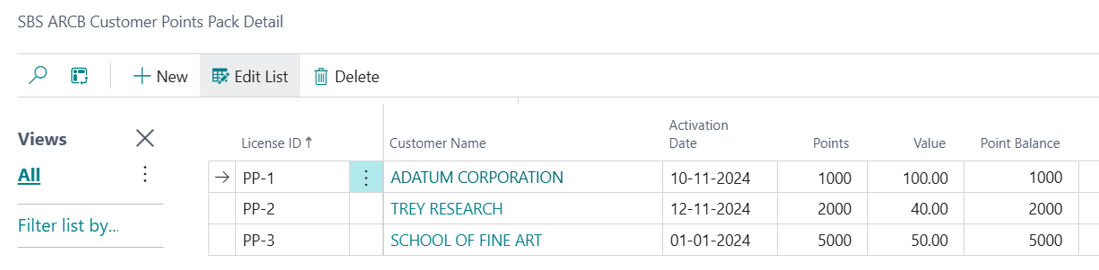
If the user attempts to delete License ID PP-2, the API will first check the Point balance. Since no points were consumed, the deletion will proceed, and the record will be deleted from the SBS ARCB Customer Point pack Detail and from SBS ARCB customer Point Pack Ledger.
However, Iif points have been consumed, then the record will not be deleted, and the following error message will be displayed.

Transfer Points
Transfer points by License ID: This will transfer the point balance from one License ID to another License ID, as long as the points are not consumed.
This is what happens during the transfer process:
-
The system will change Customer No. from the old customer to the new Customer No.
-
If the new License ID is blank, then only the customer will be changed. The license ID will remain the same.
-
If the new License ID is not blank, then the points will be transferred from the old customer to the new customer with the new License ID. A new row will be created in the points pack with new customer and a new License ID
-
Pack Ledger: A consumption entry with the transaction type Point Transfer will be created, and the points will be consumed from Old License ID.
-
Pack Ledger: A Purchase entry with the transaction type Purchase will be created, and points will be added with the same License ID and new customer.
Transfer points by Customer: This will transfer the point balance of all licenses to another new customer with previous old License ID, as long as the points are not consumed.
This is what happens during the transfer process:
-
The system will change the Customer No. on all licenses from the old customer to the new Customer No.
-
Pack Ledger: The Purchase entry points row for Old License will be created.
-
Pack Ledger: The Point Transfer entry row for the same license and a new customer will be created.
