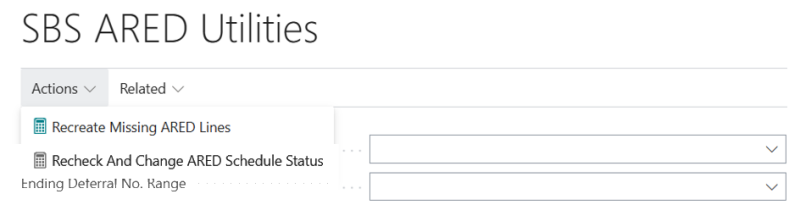
ARED Utilities
This screen has an Action button which contains two processes:
-
Recreate Missing ARED Lines
-
Generate or add missing ARED line to Deferral Schedule
-
-
Recheck and Change the ARED Schedule Status
-
Update the schedules that are completely recognized or stubbed.
-
Change the status of the deferral schedule to “Complete” and add a log entry to “audit trail” (if there is no log entry).
-
The Related button contains the following processes:
-
Correct Deferral Schedule Line Sign Values
-
Update Deferral Schedule Status (Straight line)
-
Deferral Schedule Total Correction Utility (Straight line)
-
Recreate ARED ST Deferral Data (recreates the ARED short-term deferral data)
Limitations
-
The deferral schedule must be active.
-
In the deferral schedule there is no unrecognized or un-stubbed row.
-
If the utility does not find any deferral schedule, it will give you the message “All deferral schedules are fine. Nothing to update.”
-
In case of event-based deferral schedule(s):
-
For “Percentage of completion” allocation types, if the completion percentage is not 100 then the status will remain unchanged.
-
For “By quantity” allocation types, if the allocation quantity is not equal to the invoice quantity, then status will remain unchanged.
-
For “variable amount” as allocation type, if all deferral schedule line’s amounts (revenue, discount, cogs) are not equal to the invoiced amount then status will remain unchanged.
-
-
Once the deferral schedule’s status is changed then an entry will be inserted into the audit trial.