In this article
Credit Memo: Examples
Review the following credit memo examples to better understand how a deferral schedule changes when credit memos are applied.
 Note: These examples demonstrate the functionality of the credit memo functionality. The values might not be exact due to rounding.
1. Basic - No Discount
A sales invoice for 1,200.00 is posted on January 1, 2020. The amount is deferred over 12 months using the Equal per Period option on the Deferral Schedule. This creates a schedule where the revenue is spread evenly across each month. The first five months of the schedule (January to May) have already been recognized.
The cost of the item is 800.00 and the quantity sold is 1.
Therefore, the Deferral Schedule (Original Invoice – 1,200.00 over 12 months and 5 Periods recognized) will appear as the following:
| Month | Revenue Amount | COGS | Recognized |
| Jan 20 | 100 | 66.66 | X |
| Feb 20 | 100 | 66.66 | X |
|
Mar 20 |
100 | 66.66 | X |
| Apr 20 | 100 | 66.66 | X |
| May 20 | 100 | 66.66 | X |
| Jun 20 | 100 | 66.66 | |
| Jul 20 | 100 | 66.66 | |
| Aug 20 | 100 | 66.66 | |
| Sep 20 | 100 | 66.66 | |
| Oct 20 | 100 | 66.66 | |
| Nov 20 | 100 | 66.66 | |
| Dec 20 | 100 | 66.66 | |
| Jan 21 | 100 | 66.66 |
The General Ledger entries will display as below.
| DR | CR | ||
| Deferred Revenue | 500.00 | ||
| Revenue | 500.00 | ||
| COGS | 333.33 | ||
| Deferred COGS | 333.33 |
A Create Credit Memo is created for 500.00 with Return Quantity = 1 against the posted Sales Invoice and then posted. This updates the Deferral Schedule by canceling the remaining balance and changing the status to Completed.
| Deferred Revenue | 700.00 | ||
| Revenue | 700.00 | ||
| Revenue | 500.00 | ||
| AR | 500.00 | ||
| Inventory Adjustment | 0.00 | ||
| Deferred COGS | 333.33 | ||
| Deferred COGS | 800.00 | ||
| Inventory Adjustment | 333.33 | ||
| Inventory | 800.00 |
Deferral Schedule values will display as below.
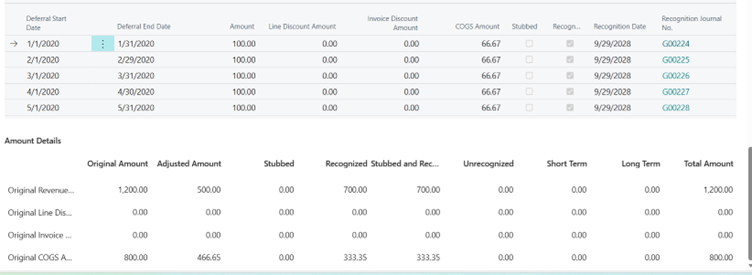
2. Return at Same Location with Different Cost
A sales invoice for 1,200.00 is posted on January 1, 2020. The amount is deferred over 12 months using the Equal per Period option on the Deferral Schedule. This creates a schedule where the revenue is spread evenly across each month. The first nine months of the schedule (January to September) have already been recognized.
The cost of the item is 800.00 and the quantity sold is 1.
| Month | Revenue Amount | COGS | Recognized |
| Jan 20 | 100 | 66.67 | X |
| Feb 20 | 100 | 66.67 | X |
|
Mar 20 |
100 | 66.67 | X |
| Apr 20 | 100 | 66.67 | X |
| May 20 | 100 | 66.67 | X |
| Jun 20 | 100 | 66.67 | X |
| Jul 20 | 100 | 66.67 | X |
| Aug 20 | 100 | 66.67 | X |
| Sep 20 | 100 | 66.67 | X |
| Oct 20 | 100 | 66.67 | |
| Nov 20 | 100 | 66.67 | |
| Dec 20 | 100 | 66.67 | |
| Jan 21 | 100 | 66.67 |
The General Ledger entries will display as below.
| DR | CR | ||
| Deferred Revenue | 900.00 | ||
| Revenue | 900.00 | ||
| COGS | 600.00 | ||
| Deferred COGS | 600.00 |
A Create Credit Memo is created for 600.00 with Return Quantity = 1 against the posted Sales Invoice and is then posted. This updates the Deferral Schedule by canceling the remaining balance and changing the status to Completed.
Note: While making a Return at the same time, the cost of item is changed to 850.00.
| Deferred Revenue | 300.00 | ||
| Revenue | 300.00 | ||
| Revenue | 600.00 | ||
| AR | 600.00 | ||
| Inventory Adjustment | - | ||
| Deferred COGS | 600.00 | ||
| Deferred COGS | 800.00 | ||
| Inventory Adjustment | 650.00 | ||
| Inventory | 900.00 | ||
| PPV | 50.00 |
Deferral Schedule values will display as below.
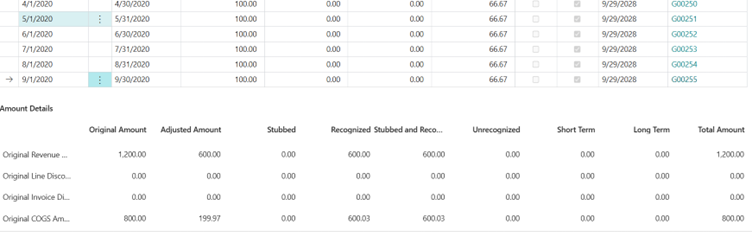
3. Return at Different Location
A sales invoice for 1,200.00 is posted on January 1, 2020. The amount is deferred over 12 months using the Equal per Period option on the Deferral Schedule. This creates a schedule where the revenue is spread evenly across each month. The first nine months of the schedule (January to September) have already been recognized.
The cost of the item is 800.00 and the quantity sold is 1.
| Month | Revenue Amount | COGS | Recognized |
| Jan 20 | 100 | 66.67 | X |
| Feb 20 | 100 | 66.67 | X |
|
Mar 20 |
100 | 66.67 | X |
| Apr 20 | 100 | 66.67 | X |
| May 20 | 100 | 66.67 | X |
| Jun 20 | 100 | 66.67 | X |
| Jul 20 | 100 | 66.67 | X |
| Aug 20 | 100 | 66.67 | X |
| Sep 20 | 100 | 66.67 | X |
| Oct 20 | 100 | 66.67 | |
| Nov 20 | 100 | 66.67 | |
| Dec 20 | 100 | 66.67 | |
| Jan 21 | 100 | 66.67 |
The General Ledger entries will display as below.
| DR | CR | ||
| Deferred Revenue | 900.00 | ||
| Revenue | 900.00 | ||
| COGS | 600.00 | ||
| Deferred COGS | 600.00 |
The Create Credit Memo is created for 600.00 with Return Quantity = 1 against this posted Sales Invoice and is posted. This updates the Deferral Schedule by canceling the remaining balance and changing the status to Completed.
Note: While making a Return at a different location, the Cost Value is 900 (e.g., A Purchase from the East Location but Returning to the West Location.)
| Deferred Revenue | 300.00 | ||
| Revenue | 300.00 | ||
| Revenue | 600.00 | ||
| AR | 600.00 | ||
| Inventory Adjustment | - (rounding) | ||
| Deferred COGS | 600.00 | ||
| Deferred COGS | 800.00 | ||
| Inventory Adjustment | 700.00 | ||
| Inventory | 900.00 | ||
| PPV | - |
Deferral Schedule values will display as below.
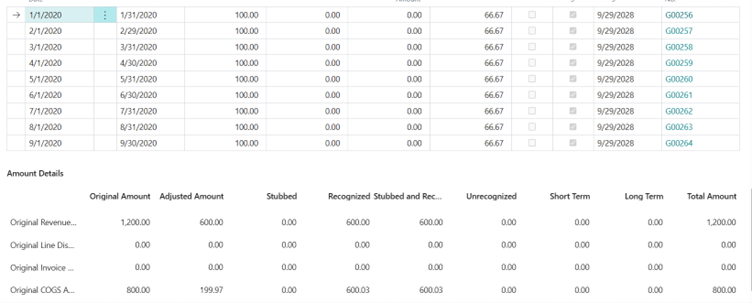
4. Multiple Quantity Posted and Partial Return (3 Quantity Posted and 1 Return)
A sales invoice for 1,200.00 is posted on January 1, 2020. The amount is deferred over 12 months using the Equal per Period option on the Deferral Schedule. This creates a schedule where the revenue is spread evenly across each month. The first nine months of the schedule (January to September) have already been recognized.
The cost of the item is 800.00 and the quantity sold is 3.
| Month | Revenue Amount | COGS | Recognized |
| Jan 20 | 300 | 200 | X |
| Feb 20 | 300 | 200 | X |
|
Mar 20 |
300 | 200 | X |
| Apr 20 | 300 | 200 | X |
| May 20 | 300 | 200 | X |
| Jun 20 | 300 | 200 | X |
| Jul 20 | 300 | 200 | X |
| Aug 20 | 300 | 200 | X |
| Sep 20 | 300 | 200 | X |
| Oct 20 | 300 | 200 | |
| Nov 20 | 300 | 200 | |
| Dec 20 | 300 | 200 | |
| Jan 21 | 300 | 200 |
The General Ledger entries will display as below.
| DR | CR | ||
| Deferred Revenue | 2700.00 | ||
| Revenue | 2700.00 | ||
| COGS | 1800.00 | ||
| Deferred COGS | 1800.00 |
The Create Credit Memo is created for 500.00 with Return Quantity = 1 against this posted Sales Invoice and is then posted. This updates the Deferral Schedule by canceling the remaining balance and changing the status to Completed.
| Deferred Revenue | 300.00 | ||
| Revenue | 300.00 | ||
| Revenue | 600.00 | ||
| AR | 600.00 | ||
| Inventory Adjustment | - | ||
| Deferred COGS | 600.00 | ||
| Deferred COGS | 800.00 | ||
| Inventory Adjustment | 600.00 | ||
| Inventory | 800.00 | ||
| PPV | - |
Deferral Schedule values will display as below.
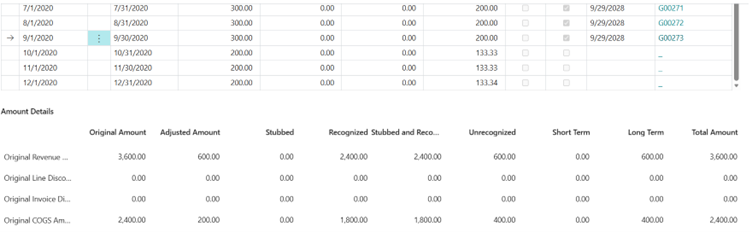
5. Return With STLT
A sales invoice for 2400.00 is posted on January 1, 2020. The amount is deferred over 24 months using the Equal per Period option on the Deferral Schedule. This creates a schedule where the revenue is spread evenly across each month. Updated line:The first ten months of the schedule (January to October) have already been recognized.
The cost of the item is 1600.00 and the quantity sold is 1.
| Month | Revenue ST | Revenue LT | Cost ST | Cost LT | Recognized |
|
Jan |
100.00 | 66.67 | X | ||
| Feb | 100.00 | 66.67 | X | ||
|
Mar |
100.00 | 66.67 | X | ||
| Apr | 100.00 | 66.67 | X | ||
| May | 100.00 | 66.67 | X | ||
| Jun | 100.00 | 66.67 | X | ||
| Jul | 100.00 | 66.67 | X | ||
| Aug | 100.00 | 66.67 | X | ||
| Sep | 100.00 | 66.67 | X | ||
| Oct | 100.00 | 66.67 | X | ||
| Nov | 100.00 | 66.67 | |||
| Dec | 100.00 | 66.67 | |||
|
Jan |
100.00 | 66.67 | |||
| Feb | 100.00 | 66.67 | |||
|
Mar |
100.00 | 66.67 | |||
| Apr | 100.00 | 66.67 | |||
| May | 100.00 | 66.67 | |||
| Jun | 100.00 | 66.67 | |||
| Jul | 100.00 | 66.67 | |||
| Aug | 100.00 | 66.67 | |||
| Sep | 100.00 | 66.67 | |||
| Oct | 100.00 | 66.67 | |||
| Nov | 100.00 | 66.67 | |||
| Dec | 100.00 | 66.67 |
The General Ledger entries will display as below.
| DR | CR | ||
| Deferred Revenue ST | 1000.00 | ||
| Revenue | 1000.00 | ||
| COGS | 666.67 | ||
| Deferred COGS ST | 666.67 | ||
| Deferred Revenue LT | 1000.00 | ||
| Deferred Revenue ST | 1000.00 | ||
| Deferred COGS ST | 666.67 | ||
| Deferred COGS LT | 666.67 |
The Create Credit Memo is created for 500.00 with Return Quantity = 1 against the posted Sales Invoice and is then posted. This updates the Deferral Schedule by canceling the remaining balance and changing the status to Completed.
| Deferred Revenue ST | 1200.00 | ||
| Deferred Revenue LT | 200.00 | ||
| Revenue | 1400.00 | ||
| Discount | - | ||
| Deferred Discount ST | - | ||
| Deferred Discount LT | - | ||
| Revenue | 500.00 | ||
| Discount | - | ||
| AR | 500.00 | ||
| Deferred COGS ST | 800.00 | ||
| Deferred COGS LT | 800.00 | ||
| Deferred COGS ST | 666.67 | ||
| Deferred COGS LT | 666.67 | ||
| Deferred COGS ST | 666.67 | ||
| Inventory Adjustment | 666.67 | ||
| Def Revenue Suspense | 500.00 | ||
| Def Revenue Suspense Offset | 500.00 | ||
| Def COGS Suspense Offset | 1600.00 | ||
| Def COGS Suspense | 1600.00 | ||
| Def Discount Suspense Offset | - | ||
| Def Discount Suspense | - | ||
| Inventory | 1600.00 | ||
| PPV | - |
6. Return With P&L and Discount Net
A sales invoice for 1,200.00 is posted on January 1, 2020. The amount is deferred over 12 months using the Equal per Period option on the Deferral Schedule. This creates a schedule where the revenue is spread evenly across each month. The first nine months of the schedule (January to September) have already been recognized.
| Month | Revenue Amount | COGS | Recognized |
| Jan 20 | 100 | 66.67 | X |
| Feb 20 | 100 | 66.67 | X |
|
Mar 20 |
100 | 66.67 | X |
| Apr 20 | 100 | 66.67 | X |
| May 20 | 100 | 66.67 | X |
| Jun 20 | 100 | 66.67 | X |
| Jul 20 | 100 | 66.67 | X |
| Aug 20 | 100 | 66.67 | X |
| Sep 20 | 100 | 66.67 | X |
| Oct 20 | 100 | 66.67 | |
| Nov 20 | 100 | 66.67 | |
| Dec 20 | 100 | 66.67 | |
| Jan 21 | 100 | 66.67 |
The General Ledger entries will display as below.
| DR | CR | ||
| Deferred Revenue | 900.00 | ||
| Revenue | 900.00 | ||
| COGS | 600.00 | ||
| Deferred COGS | 600.00 |
The Create Credit Memo is created for 500.00 with Return Quantity = 1 against this posted Sales Invoice and is then posted. This updates the Deferral Schedule by canceling the remaining balance and changing the status to Completed.
| Deferred Revenue | 300.00 | ||
| Revenue | 300.00 | ||
| Revenue | 500.00 | ||
| AR | 500.00 | ||
| Inventory Adjustment | - | ||
| Deferred COGS | 600.00 | ||
| Deferred COGS | 800.00 | ||
| Inventory Adjustment | 600.00 | ||
| Def Revenue Suspense | 500.00 | ||
| Def Revenue Suspense Offset | 500.00 | ||
| Def COGS Suspense Offset | 800.00 | ||
| Def COGS Suspense | 800.00 | ||
| Inventory | 800.00 | ||
| PPV | - |
Event Based
A sales invoice of 9,500 for an event-based item has the following deferral schedule:
| Event Description | Expiry Date | Event Amount |
| Training | March 31, 2018 | 2,500.00 |
| Implementation | 5,000.00 | |
| Maintenance | 2,000.00 |
A credit memo for 950 is created on June 15. The deferral schedule is updated as follows:
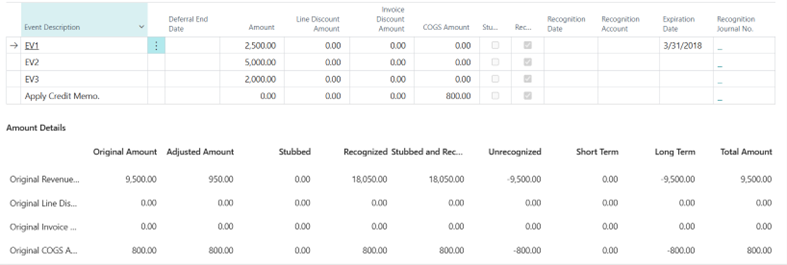
When credit memos are applied, a line with a negative amount for the credit memo is added to the deferral schedule.
Integration with ARCB
A sales invoice is created in ARCB with the following billing schedule:
- Billing schedule amount: 3,600.00
- Dates: 2017-January 01 to 2019-December 31
- Frequency: Annually
- Fiscal periods (deferral frequency): Monthly
| Billing Start Date | Billing End date | Deferral Start Date | Deferral End Date | Qty | Unit Price | Net Amount | Billed | Deferral Schedule |
| January 01, 2017 | December 31, 2017 | January 01, 2017 | December 31, 2017 | 1 | 1,200 | 1,200.00 | X | ARED-1 |
| January 01, 2018 | December 31, 2018 | January 01, 2018 | December 31, 2018 | 1 | 1,200 | 1,200.00 | X | ARED-2 |
| January 01, 2019 | December 31, 2019 | January 01, 2019 | December 31, 2019 | 1 | 1,200 | 1,200.00 | X | ARED-3 |
- Example A: The billing schedule is terminated on March 15, 2018 with the following settings:
- Deferral adjustment method: Unrecognized periods OR Entire schedule
- Prorate daily: No
New schedule amount: 1200 - 900 = 300.00.
 View deferral schedule.
- Deferral Schedule ARED-1: The schedule ends before the termination date. The deferral schedule is not changed.
- Deferral Schedule ARED-2: The deferral schedule is changed based on the credit memo that is applied. Review updated deferral schedule.
- Deferral Schedule ARED-3: The schedule starts after the termination date. The credit memo is applied to the full amount (1,200.00) of the deferral schedule. All lines are removed, and the status of the deferral schedule is changed to completed.
| January | February | March | April | May | June | July | August | September | October | November | December | |
| ARED-1 | 100.00 | 100.00 | 100.00 | 100.00 | 100.00 | 100.00 | 100.00 | 100.00 | 100.00 | 100.00 | 100.00 | 100.00 |
|---|---|---|---|---|---|---|---|---|---|---|---|---|
| ARED-2 | 100.00 | 100.00 | 100.00 | 100.00 | 100.00 | 100.00 | 100.00 | -400.00 | Deleted | Deleted | Deleted | Deleted |
| Recognized | X | X | X | X | X | X | X | |||||
| ARED-3 | Deleted | Deleted | Deleted | Deleted | Deleted | Deleted | Deleted | Deleted | Deleted | Deleted | Deleted | Deleted |
- Example B: The billing schedule is terminated on March 15, 2018 with the following settings:
- Deferral adjustment method: Unrecognized periods OR Entire schedule
- Prorate daily: Yes
View deferral schedule.
- Deferral Schedule ARED-1: The schedule ends before the termination date. The deferral schedule is not changed.
- Deferral Schedule ARED-2: The deferral schedule is changed based on the credit memo that is applied. Review updated deferral schedule.
- Deferral Schedule ARED-3: The schedule starts after the termination date. The credit memo is applied to the full amount (1,200.00) of the deferral schedule. All lines are removed, and the status of the deferral schedule is changed to completed.
| January | February | March | April | May | June | July | August | September | October | November | December | |
| ARED-1 | 100.00 | 100.00 | 100.00 | 100.00 | 100.00 | 100.00 | 100.00 | 100.00 | 100.00 | 100.00 | 100.00 | 100.00 |
|---|---|---|---|---|---|---|---|---|---|---|---|---|
| ARED-2 | 100.00 | 100.00 | 100.00 | 100.00 | 100.00 | 100.00 | 100.00 | -456.71 | Deleted | Deleted | Deleted | Deleted |
| Recognized | X | X | X | X | X | X | X | |||||
| ARED-3 | Deleted | Deleted | Deleted | Deleted | Deleted | Deleted | Deleted | Deleted | Deleted | Deleted | Deleted | Deleted |
- Example C: The billing schedule is terminated on October 22, 2018, with the following settings:
- Deferral adjustment method: Unrecognized periods
- Prorate daily: No
View deferral schedule.
- Deferral Schedule ARED-1: The schedule ends before the termination date. The deferral schedule is not changed.
- Deferral Schedule ARED-2: The deferral schedule is changed based on the credit memo that is applied. Review updated deferral schedule.
- Deferral Schedule ARED-3: The schedule starts after the termination date. The credit memo is applied to the full amount (1,200.00) of the deferral schedule. All lines are removed, and the status of the deferral schedule is changed to completed.
| January | February | March | April | May | June | July | August | September | October | November | December | |
| ARED-1 | 100.00 | 100.00 | 100.00 | 100.00 | 100.00 | 100.00 | 100.00 | 100.00 | 100.00 | 100.00 | 100.00 | 100.00 |
|---|---|---|---|---|---|---|---|---|---|---|---|---|
| ARED-2 | 100.00 | 100.00 | 100.00 | 100.00 | 100.00 | 100.00 | 100.00 | 100.00 | 100.00 | 100.00 | Deleted | Deleted |
| Recognized | X | X | X | X | X | X | X | |||||
| ARED-3 | Deleted | Deleted | Deleted | Deleted | Deleted | Deleted | Deleted | Deleted | Deleted | Deleted | Deleted | Deleted |
- Example D: The billing schedule is terminated on October 22, 2018, with the following settings:
- Deferral adjustment method: Unrecognized periods
- Prorate daily: Yes
Number periods (for EPP calculation) = 2 + (22/31) = 2.7097
Amount per period = (969.86 - 700) / 2.7097 = 99.59
Last line = 99.59 * 0.7097 = 70.68
View deferral schedule.
- Deferral Schedule ARED-1: The schedule ends before the termination date. The deferral schedule is not changed.
- Deferral Schedule ARED-2: The deferral schedule is changed based on the credit memo that is applied. Review updated deferral schedule.
- Deferral Schedule ARED-3: The schedule starts after the termination date. The credit memo is applied to the full amount (1,200.00) of the deferral schedule. All lines are removed, and the status of the deferral schedule is changed to completed.
| January | February | March | April | May | June | July | August | September | October | November | December | |
| ARED-1 | 100.00 | 100.00 | 100.00 | 100.00 | 100.00 | 100.00 | 100.00 | 100.00 | 100.00 | 100.00 | 100.00 | 100.00 |
|---|---|---|---|---|---|---|---|---|---|---|---|---|
| ARED-2 | 100.00 | 100.00 | 100.00 | 100.00 | 100.00 | 100.00 | 100.00 | 99.59 | 99.59 |
70.68 End = October 22 |
Deleted | Deleted |
| Recognized | X | X | X | X | X | X | X | |||||
| ARED-3 | Deleted | Deleted | Deleted | Deleted | Deleted | Deleted | Deleted | Deleted | Deleted | Deleted | Deleted | Deleted |
- Example E: The billing schedule is terminated on October 22, 2018, with the following settings:
- Deferral adjustment method: Entire schedule
- Prorate daily: Yes
New schedule amount: 1200 - 230.14 = 969.86
Number periods (for EPP calculation) = 9 + (22/31) = 9.7097 ;Note: If not using EPP, the calculation is based on days.
Amount per period = 969.86 / 9.7097 = 99.89
True up line = 99.89 - (100 - 99.89)*7 = 99.12
View deferral schedule.
- Deferral Schedule ARED-1: The schedule ends before the termination date. The deferral schedule is not changed.
- Deferral Schedule ARED-2: The deferral schedule is changed based on the credit memo that is applied. Review updated deferral schedule.
- Deferral Schedule ARED-3: The schedule starts after the termination date. The credit memo is applied to the full amount (1,200.00) of the deferral schedule. All lines are removed, and the status of the deferral schedule is changed to completed.
| January | February | March | April | May | June | July | August | September | October | November | December | |
| ARED-1 | 100.00 | 100.00 | 100.00 | 100.00 | 100.00 | 100.00 | 100.00 | 100.00 | 100.00 | 100.00 | 100.00 | 100.00 |
|---|---|---|---|---|---|---|---|---|---|---|---|---|
| ARED-2 | 100.00 | 100.00 | 100.00 | 100.00 | 100.00 | 100.00 | 100.00 | 99.12 | 99.89 |
70.85 End = October 22 |
Deleted | Deleted |
| Recognized | X | X | X | X | X | X | X | |||||
| ARED-3 | Deleted | Deleted | Deleted | Deleted | Deleted | Deleted | Deleted | Deleted | Deleted | Deleted | Deleted | Deleted |