In this article
SBS ARED Delete Schedule Utility
 Important: Utilities should be run by an administrator for exception reasons only. For more information about this utility, contact your administrator.
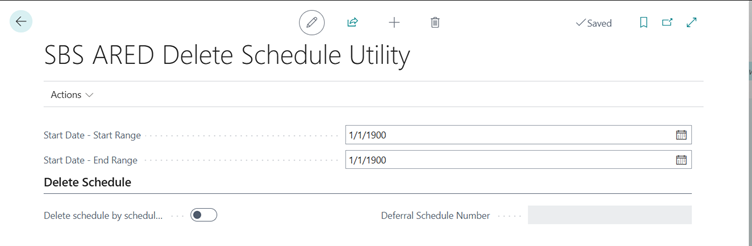
Use this page to perform one of the following actions for deferral schedules:
- Delete orphaned deferral transaction lines
- Correct the start and end dates for orphaned deferral schedule lines
Actions
Users can specify the date range, and can perform various operations within the Action button. The Action button contains the following options:
| Button | Description |
| Delete Orphaned ARED Transaction Lines |
Deletes all orphaned transaction lines in deferral schedules. Orphaned transaction lines do not have a deferral schedule number in the header of the SBS ARED Deferral Schedules page. This action is intended for use for orphaned deferral schedule lines that were created before Subscription Billing version 1.0.4.21. |
| Correct Schedule Line Start/End Dates Orphaned |
Corrects the start and end dates for orphaned lines in deferral schedules. The start and end dates for lines within deferral schedules where the source billing schedule exists are updated based on the corresponding line in the billing schedule. For example, after importing data through a configuration package, lines in deferral schedules have had unusual start dates such as January 01, 1900. This action corrects the start and end dates for these lines.
|
| Delete Schedule |
Allows the selected Deferral Schedule to be deleted. Note: If the Delete Schedule By Schedule Number checkbox is selected, users can select the Deferral Schedule Number, from which the Deferral Schedule can be selected and deleted accordingly. |
| Update ARED Transaction Details | Updates the details of the selected ARED transaction. |

